kvm
Does my CPU support Virtualization and is it enabled in BIOS / UEFI?
[gans@server1 ~]$ grep -c vmx /proc/cpuinfo
1
[gans@server1 ~]$
[gans@server1 ~]$ lsmod | grep kvm
kvm_intel             170086  0
kvm                   566340  1 kvm_intel
irqbypass              13503  1 kvm
How to run nested KVM within VMWare ESXi (5.5)
- Shutdown the VM
2. Locate the guest hypervisor virtual machine configuration file (<VM-name.vmx>), edit and add the following line at the end
vhv.enable = "TRUE"
3. Identify the nested hypervisor vm ID and reload it’s configuration with the vim-cmd esxi command
~ # vim-cmd vmsvc/getallvms | grep -i 50_s1
    30     RH_Lab122_50_s1          [datastore3] RH_Lab122_50_s1/RH_Lab122_50_s1.vmx             rhel6_64Guest           vmx-10
~ #
~ # vim-cmd vmsvc/reload 30
- Start the VM
5. Verify that the nested hypervisor correctly detects the vmx flag
[gans@server1 ~]$ grep -c vmx /proc/cpuinfo
1
Packages to install for KVM in RHEL
These can be installed via the GNOME Software Manager
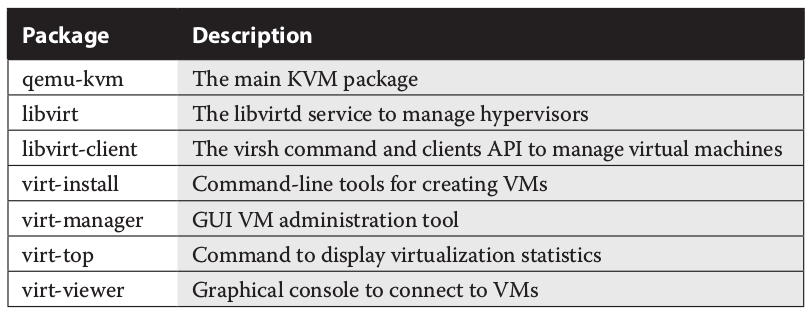
As an alternative, install the Virtualization Host and Virtualization Client groups:
# yum group install "Virtualization Host" "Virtualization Client"
Move KVM Storage location to another place
One advantage of this setup is that it retains the default SELinux settings for the /var /lib/libvirt/images directory, as defined in the file_contexts file in the /etc/selinux/targeted /contexts/files directory. In other words, this configuration survives a relabel of SELinux
# mkdir /home/gans/KVM
# su -
# semanage fcontext -a -t virt_image_t '/home/gans/KVM(/.*)?'
# restorecon /home/gans/KVM
# rmdir /var/lib/libvirt/images
# ln -s /home/gans/KVM /var/lib/libvirt/images
File permission issues when changing the VM Storage location to another place
When installing the first VM there may be permission errors for the linked /var/lib/libvirt/images directory. In my case I linked to /home/gans/KVM - so best approach for me to overcome these errors was to run virt-manager as my own user.
In file /etc/libvirt/qemu.conf find the user and group parameters and uncomment | enter own user and group information.
vi /etc/libvirt/qemu.conf
systemctl restart libvirtd.service
Application documentation - admin, usertasks a.s.o
Documented under applications kvm: Mounting installation media for VM installation.